New feature: Online Training Courses

Under the Guides and Advice Section you can now access Online Training Courses. These courses will help you develop your teaching skills and understanding in a different way compared to the Teaching Guides.

The first Training Course available is on Questioning Fundamentals. This course will give you proven questioning techniques to improve the quality of the interactions you have with your students.

Access the Training Courses Section here and enrol in the Questioning Fundamentals Course here.

More courses will be available soon on various topics. If you complete this course please send us an email with your thoughts on what you liked/disliked so we can improve future courses.

Garageband on iPad

iPad apps for guitar students

Want to treat your students?

If you know your student has an iPad (or iPhone) and you're feeling generous, why not give your student a special gift? Purchase a $20 iTunes Gift Card and ask them to use it to purchase the following apps. This achieves a couple of positive things. First, it increases the relationship between you and your student. Your student will appreciate the fact that you have bought them the gift card.

Why buy a gift card?

You may wonder why you should buy a gift card at all when there are plenty of great free apps available. The reason is your student will have an incentive to take your gift more seriously as they know you spent money on it. They will be more likely to use the apps because they know you 'bought' them for the student. You can still suggest free apps for the student to download, but buying apps for the student has a much more profound effect.

Four essential apps for $20

The apps below will help you as a teacher as well as directly help the student. There are plenty of other guitar related apps available but based on feedback from our own students, these apps do a great job.

Garageband - $4.99
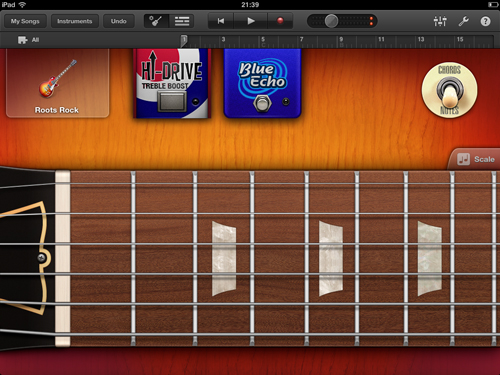
Garageband on iPad

This app is essential not only for you as a teacher, but for your student as a guitar player. Not only can the student learn to write their own songs and understand different instruments, but they can even plug their guitar in (with the right adapter) and record their own playing. This app is worth far more than the $4.99 listed and once you play around with it you'll see why. You can use this app to teach your student how to apply music theory, how to come up with good progressions, writing drum beats, bass parts, keyboard parts etc.

From a teacher's point of view, this app is extremely useful during lessons. You can quickly come up with a backing track on the student's iPad, save it, then the student can simply load it to practice with at home. You can even send tracks to your student's iPad or ask your student to send you tracks they're working on. If you have an iPad, it's worth getting this app purely for the freedom it gives you as a teacher.

Check out Garageband here

Guitarist's Reference - $4.99
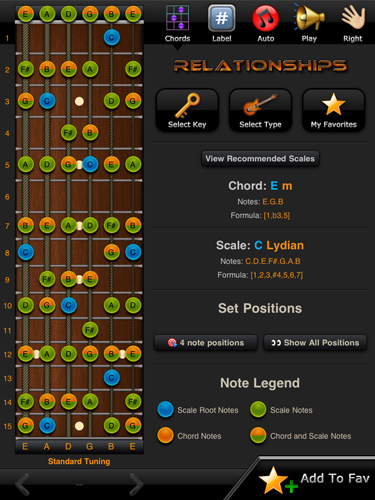
Guitarists Reference on iPad

This is a fantastic reference app that includes plenty of information of scales, chords and keys. The chord encyclopedia contains over 3000 chords and 42 scale types are included in every key. The large iPad screen allows a large fretboard diagram so your student can easily sit the iPad down to practice new chords and scales.

Check out Guitarist's Reference here

Metronome - $1.99
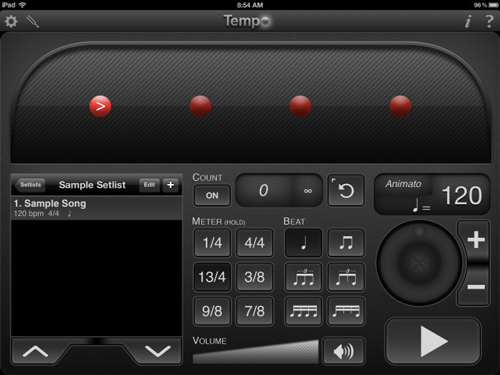
Metronome on iPad

There are plenty of metronome apps available however this one is simple yet it contains plenty of useful features. The student can save settings under different song names which comes in handy when practicing various parts at different tempos.

Check out Metronome here

Guitar Pro - $7.99
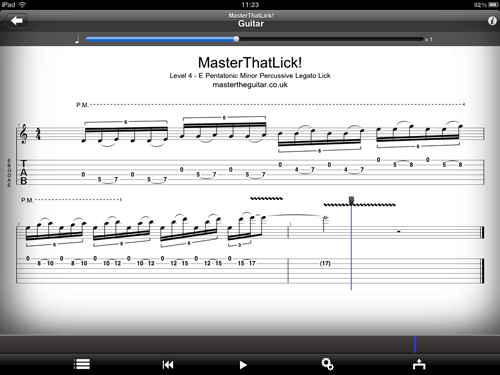
Guitar Pro on iPad

If your student doesn't have Guitar Pro on their PC/Mac, then this app is extremely handy. With it, your student will be able to access the huge range of Guitar Pro files available on sites such as ultimate-guitar.com. If you haven't used Guitar Pro before, it's an extremely useful app that displays and plays back Guitar TABs and usually includes other instruments as well as the guitar parts. The student can learn to jam along with the track while watching the Guitar TAB scroll across the screen.

There are plenty of features to talk about but from a teacher's perspective, one of the most useful is the ability to send Guitar Pro files to your student's iPad wirelessly or via email. This means you can send your student everything they need to practice and they will have everything ready to play within seconds.

Check out Guitar Pro here


Summary

Please note that prices for these apps may vary based on your location. If you're currency isn't in Dollars, just make sure whatever gift card you do purchase is enough to cover whatever apps you suggest.

Of course $20 is a lot of money to spend on your student, but consider the impact apps like these can have on the student's development as well as their commitment to your lessons. By caring enough about your student's progress to buy a $20 gift card, they're likely to pay you back in return in the way of dedication. While some teachers feel that it's the student's responsibility to purchase all teaching material, we feel that you create far more goodwill with your student by providing the materials for them. That's partly why Live and Teach Guitar exists, so you can download all the materials you need to give to your students so they don't need to buy anything extra. After all, isn't that why your student pays you?

How to use the iPad as a guitar teaching tool

We've created a guide to help you use the iPad in your lessons. Check it out at TTL-04 Using an iPad as a teaching tool. The guide also includes other apps you may consider using as a teacher.

TTQ-05 Questioning Techniques

About this guide

Questioning is one of the most important aspects of teaching and takes up a large portion of your time as a teacher. While you may feel you already understand your student's needs well with your questioning, it's worth spending the time to learn effective questioning techniques. A lot of research has been completed to properly understand what questioning techniques work. This guide will explain the most useful and effective questioning techniques you can use as a guitar teacher.

If you want to improve the quality of your teaching, it is imperative that you fully understand and use these questioning techniques. Each type of question is explained and given in examples. Tips and best practices are provided so you can start using the techniques straight away.

Why the questions you ask matter

As a teacher it's your job to make sure you provide the student with the best quality tuition possible. Asking the right type of questions will help you become a more effective teacher. Studies have shown that teachers that use effective questioning techniques were able to provide better quality instruction compared to teachers not using effective questioning. In a nutshell - questioning has a big impact on your effectiveness as a teacher.

You can use questions for a variety of purposes, such as:

  • To increase interest and motivation
  • To review previous lesson topics
  • To assess achievement of goals
  • To encourage student insights
  • To actively involve the student
  • To allow the student to think critically

Questions also allow you to focus your student's attention and move their train of thought in the right path. Using the wrong type of questions can discourage the student and hinder their progress. As you can see, it's important to use the right questions effectively.

Only Live and Teach Guitar Members have access to this resource and all other resources on the site.

If you're a member, please login to access this resource

If you're not a member yet, find out how our professional materials, resources and support can help you succeed as a guitar teacher here.

Please login or register to gain full access now

New guide on teaching guitar via Skype

If you want more flexibility with your schedule or want to fill up your schedule but can't seem to find more students, teaching guitar online may be the solution you need. When done right you can teach students across the globe and choose your own hours as there will always be people looking for teachers.

This guide will help you get started with teaching online via Skype or similar software. It discusses the common issues, limitation and solutions to teaching online as well as provides you with best practices from other teachers who already teach online.

Check it out here: BXP-01 Teaching Online via Skype

More guides are available in the Business Guides section.

BXP-01 Teaching Guitar Online

About this guide

Teaching guitar online is a great way to expand your guitar teaching business. If you find you have trouble finding students to fit in your schedule, opening yourself up to online lessons could be the solution. Not only can you find students across the globe to fit your schedule, but it's also a great way to build your reputation as a teacher.

In the past, a platform called Skype was the go-to method of teaching guitar online. Skype has since lost popularity and shut down completely in 2025. Zoom became the most popular platform thanks to the 2019 global pandemic.

The pandemic also caused a massive surge in popularity in online lessons. While learning guitar online via webcam used to be uncommon, it's now the most common way people choose to learn guitar with a teacher. In-person guitar lessons are still popular, but people today are comfortable with taking lessons online.

This guide will explain the important points you need to succeed with this type of lesson. The biggest mistake people make when teaching guitar online is to assume it's the same as a lesson in person. This guide will show you how you can succeed with online lessons.

Why teach guitar online?

If you're not sure if online lessons are for you, here are a few reasons from other members on why they teach guitar online:

  • Flexibility with schedules
  • Reach more students
  • Able to teach full-time
  • Low cost
  • Convenience (no travel)

There are many more reasons, but the above reasons are why a lot of guitar teachers teach online.

The main reason you may decide to teach guitar online is flexibility. Want to teach guitar at 3am? You may have trouble finding students in your local area wanting to learn guitar at that hour but you're sure to find somebody in a different time zone. Have trouble finding students to teach during the mornings? There will be people in other countries keen to take those times.

Zoom - the go-to platform

Zoom (now called Zoom Workplace) is currently the most popular way of hosting guitar lessons. It started off as a virtual meeting platform and exploded in popularity after the global pandemic.

While Zoom Workplace is primarily meant for businesses and teams to run meetings, it works perfectly fine for guitar lessons.

Features are constantly changing, so check out zoom.com to see what they currently offer and their pricing. While there is a free option, depending on your teaching needs you may need to pay for a plan.

Only Live and Teach Guitar Members have access to this resource and all other resources on the site.

If you're a member, please login to access this resource

If you're not a member yet, find out how our professional materials, resources and support can help you succeed as a guitar teacher here.

Please login or register to gain full access now